SYSLOG: Complete Guide for Network Monitoring
Essential CCNA Topic for Network Troubleshooting and Management
By Netacad Expert Saeed Ahmad | CCNA Guru Dubai
👨🏫 Instructor Insight
Saeed Ahmad: “SYSLOG is your network’s diary. It tells you what’s happening when you’re not watching. Mastering it is crucial for effective network administration and CCNA exam success.”
Connect for CCNA Guidance📋 What is SYSLOG?
SYSLOG is a standard for message logging that allows network devices to send event messages to a logging server (called a SYSLOG server). It provides a centralized repository for log messages from various network components.
Think of SYSLOG as your network’s “black box” recorder – it captures everything that happens, from routine operations to critical failures.
🎚️ SYSLOG Levels (0-7)
❓ Why SYSLOG is Required in Networks
🔍 Proactive Monitoring
Detect issues before they become critical failures by monitoring warning and error messages in real-time.
🛡️ Security Compliance
Meet regulatory requirements by maintaining audit trails and security event logs for forensic analysis.
⚡ Quick Troubleshooting
Reduce Mean Time to Repair (MTTR) by having detailed logs of network events and configuration changes.
📊 Performance Analysis
Identify performance bottlenecks and capacity issues through systematic log analysis and trend monitoring.
🌟 Key Benefits of Implementing SYSLOG
Centralized Logging
Collect logs from all network devices in one central location for easy management
Enhanced Security
Monitor security events and detect intrusion attempts in real-time
Historical Analysis
Maintain historical data for trend analysis and capacity planning
Compliance Ready
Meet industry standards and regulatory requirements for log retention
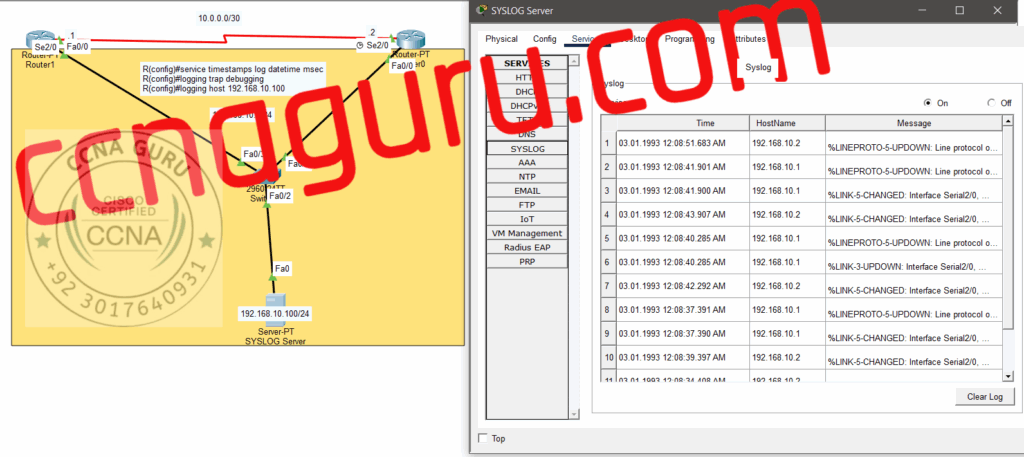
🎯 SYSLOG’s Role in Network Management
🔄 Change Management
Track all configuration changes and identify who made changes and when.
🚨 Incident Response
Provide crucial information for security incident investigation and response.
📋 Audit Trail
Maintain comprehensive records for internal and external audits.
🔧 SYSLOG Configuration in Packet Tracer
Basic SYSLOG Configuration on Cisco Router
🎯 Step 1: Enable Logging
Router> enable
Router# configure terminal
Router(config)# logging on
Router(config)# logging host 192.168.1.100
Router(config)# logging trap informational
⚙️ Step 2: Configure Logging Levels
! Set timestamp for logs
Router(config)# service timestamps log datetime
! Set buffer size
Router(config)# logging buffered 16384
! Enable console logging
Router(config)# logging console informational
🔐 Advanced SYSLOG Configuration
🎯 Source Interface Configuration
! Specify source interface for SYSLOG messages
Router(config)# logging source-interface gigabitethernet0/0
! Enable sequence numbers
Router(config)# service sequence-numbers
! Set facility local7 for custom applications
🎓 SYSLOG in CCNA Certification
Exam Topics
SYSLOG configuration and interpretation is a key topic in CCNA 200-301 exam
Practical Skills
Hands-on configuration skills tested in simulation questions
Real-World Value
Essential skill for network administrators in enterprise environments
🎓 Master SYSLOG in Our CCNA Classes
Learn advanced network monitoring with hands-on labs and expert guidance from Saeed Ahmad